


Signal Private Messenger
4.5134.02K Reviews
App Specs
- Version
- 8.18.2
- Updated On
- License
- Free
- Downloads
- 100,000,000+
- Developer
- Signal Foundation
- Categories
- Communication
- Platform
- Android
Screenshots

 Analysis by AppCompare
I find Signal most convincing when I think of it not as a magic shield, but as a practical messaging app that puts privacy near the centre of everyday communication. It still needs your friends and family to use it, and it may not replace every chat tool you rely on. But if you want a straightforward place for personal conversations, calls, and group chats without an ad-heavy feel, it is one of the easier options I’d recommend trying.
A privacy-first choice that still feels familiar
Signal is a free communication app from Signal Foundation. Its focus is personal messaging rather than a public feed or a large ecosystem of services, which makes the experience feel relatively direct: open a conversation, write a message, call someone, or share a file. I appreciate that privacy is part of the app’s central purpose rather than a setting I have to hunt for after signing up.
That focus does not mean every conversation becomes private by default in a way that removes all judgment from the user. The person on the other end can still save, photograph, or otherwise share what they see, and a secure channel cannot prevent someone from forwarding information outside it. I treat Signal as a better place for sensitive conversations, not as a guarantee that anything sent will remain secret forever.
What the privacy tools are useful for
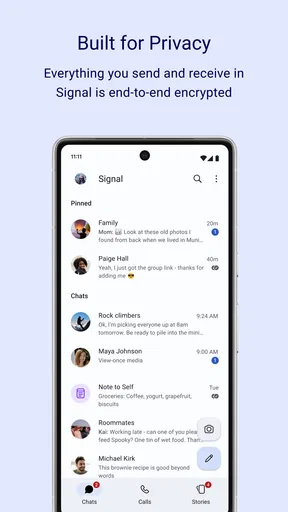
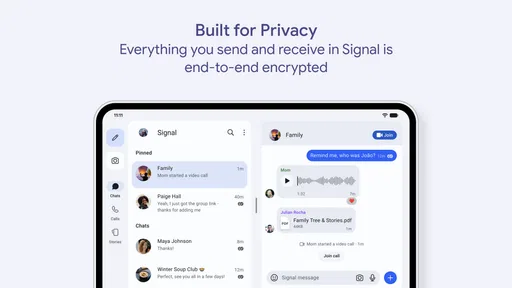
End-to-end encryption is the main reason many people look at Signal. In ordinary terms, it is designed so that a conversation is readable by the participants, rather than being open to the messaging service as it travels between them. That is a meaningful distinction from services where privacy controls can depend on which chat type or setting you happen to use.
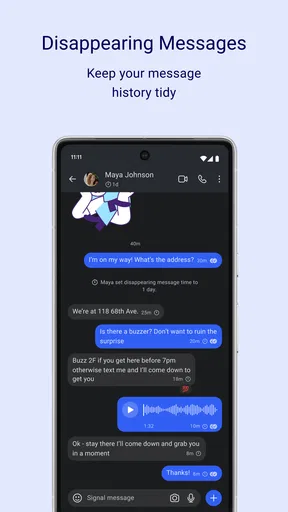
Disappearing messages are useful for reducing the clutter of a conversation or for short-lived details, such as coordinating a meeting place. I would not use them as a substitute for careful sharing: a recipient can capture information before it disappears. Screen security can add another layer against casual screenshots on supported devices, but it should be understood as a deterrent, not an all-purpose way to control what another person does with a message.
Everyday setup and social friction
Getting started is uncomplicated: install the app, verify your number, and find people who are available to chat there. The simple onboarding is a plus, but it also points to Signal’s biggest practical hurdle. A messaging app is only useful if the people you need to reach are on it, so you may end up keeping your usual messenger for family, work, or community groups that have not moved.
A realistic way to try it is to invite one close contact rather than asking everyone to switch at once. Use Signal for a particular kind of conversation—perhaps planning a trip or sharing personal updates—and see whether the two of you like the routine. That gives you a fair test without creating a second, confusing copy of every group chat in your life.
Worth Reading Before You Choose

Switching to Android Auto Means Rethinking Your Driving Routine

Google Calendar Makes a Crowded Week Easier to Manage

Baby Panda World Brings Quick Play to Modern Phones, but Its Game Library Feels Busy

ESPN’s Live Game View Makes Following Close Games Easier

QuizzLand Review: A Good Fit for Short Trivia Breaks, Not Every Player

Basketball Stars: Multiplayer Is Fast, but Can It Recover When Matches Go Wrong?
Who will get the most from it
I’d recommend Signal to people who value private one-to-one chats and calls, and to anyone who wants a less distracting alternative to a messenger crowded with promotions or extra services. It is also a sensible choice for a small group that can agree to use it consistently. If your priority is reaching the largest possible number of contacts in one place, though, your existing mainstream messenger may be more convenient.
Signal has an average rating of 4.6 from around 2.8 million ratings, and it has passed 100 million installs. Those figures suggest broad interest, but they do not resolve the personal question that matters most: whether your contacts will use it. It is free, rated for Everyone, and the current version is 7.68.5; optional in-app purchases are listed at $1.99 per item. The app has been available since May 25, 2010, so this is an established service rather than a brand-new experiment.
When it comes to messaging apps, we all want something that's secure, easy to use, and loaded with features. Enter Signal Private Messenger, the app that's been making waves for its top-notch security and privacy features. Let's dive into what makes Signal a must-have app on your phone.
Why Signal Stands Out
So, what's the big deal about Signal Private Messenger? Well, if you're someone who's concerned about privacy, this app is a game-changer. It offers end-to-end encryption, which means your messages are for your eyes only — and the person you sent them to, of course. Unlike some other apps, Signal doesn’t store your data, so you can chat freely without worrying about Big Brother peeking over your shoulder.
User-Friendly Experience
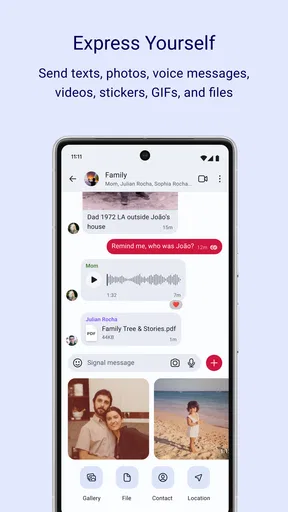
Now, let's talk about usability. Signal isn't just about security; it's also super easy to use. The interface is clean, intuitive, and not cluttered with ads or unnecessary features. You can send messages, make voice and video calls, and even share files without any fuss. Plus, setting up Signal is a breeze. You just download the app, verify your number, and you're good to go.
Cool Features You Can’t Miss
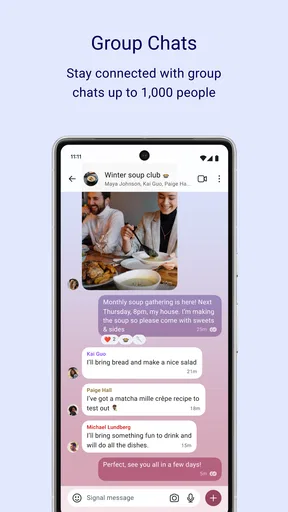
Aside from the security perks, Signal comes packed with some pretty neat features. You can set messages to disappear after a certain time, which is perfect for those secret plans or just keeping things tidy. The app also supports group chats, allowing you to add up to 1000 members. Fancy some fun? Signal has a range of stickers to spice up your conversations.
And for those who like to keep things private, you’ll love Signal’s screen security feature, which prevents anyone from taking screenshots of your chats. It’s like having your personal security guard — no more worrying about your messages being shared without your consent.
Performance and Reliability
Performance-wise, Signal is as reliable as they come. Messages are sent and received almost instantly, and calls are crystal clear. Even with a spotty internet connection, Signal holds its own, ensuring you stay connected with your friends and family.
Final Thoughts
In a world where privacy is becoming a rare commodity, Signal Private Messenger offers a refreshing alternative. It's not just about sending texts or making calls; it's about feeling secure while doing so. With its user-friendly design and robust security features, Signal is a solid choice for anyone looking to take their messaging experience to the next level. So, if you haven’t tried it yet, give Signal a download — your privacy will thank you!
How Signal fits alongside other messengers
Compared with the messenger most people already use, Signal’s clearest advantage is its privacy-first approach and relatively focused design. It covers the familiar basics—text chats, voice and video calls, groups, and file sharing—without asking me to treat it as a social network or a hub for unrelated services. That focus is appealing if you want a dedicated place for private conversations.
The trade-off is reach and habit. Your usual app may be more convenient for a family group, neighborhood chat, or workplace circle simply because everyone is already there. Signal is a better fit when the people involved are willing to join you; it is not automatically the better choice for every conversation just because privacy matters to you. I would keep the existing messenger for contacts who will not switch rather than turn a simple preference into a barrier to staying in touch.
Small habits that make the tools work better
For a group coordinating something temporary, disappearing messages can help keep the thread from becoming a long-term record of changing plans. I’d still put essential details somewhere durable before the timer runs out. A useful distinction is to use the feature for conversational housekeeping, not for information you may need later, such as a final address or an agreed schedule.
For a sensitive chat, I’d also pause before sending a file or message and consider whether the recipient needs the full detail. Encryption protects the route between participants; it does not remove the human side of privacy. Screen security may discourage a quick screenshot on a supported device, but it cannot stop someone from using another camera or repeating what they read. That is why trust and sensible sharing remain part of using the app well.
Calls, groups, and the practical limits
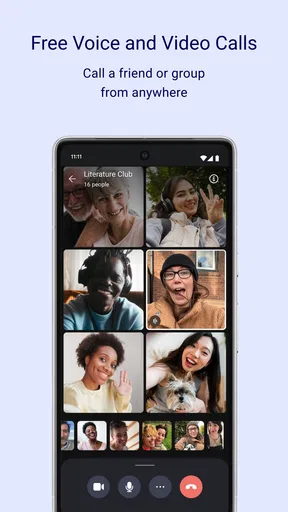
Signal’s mix of messaging and voice and video calls makes it useful when a conversation naturally shifts from text to talking. I like not having to move to a separate service just because a quick explanation is easier aloud. Still, call quality depends on the connection and the devices at both ends, so I would not treat any messaging app as a guaranteed replacement for a reliable phone call in every situation.
Groups can make the app more useful than a one-to-one privacy tool, especially when a small circle agrees to use it for ongoing plans. The stated group capacity reaches up to 1,000 members, but that does not mean a very large group will feel manageable. For a close group, clear expectations about what belongs in the chat matter more than the maximum size; for a public-facing community, a platform designed around discovery and moderation may be a better match.
Questions worth settling before you switch
If you are wondering whether Signal can replace your current messenger, my answer is: only if the people you regularly contact are willing to use it too. You can install it without abandoning other apps, and a gradual trial with one trusted person is often the least disruptive way to decide. The main cost is not money but the coordination involved in getting a group to adopt a new habit.
If your concern is whether disappearing messages make a conversation impossible to keep, they are best understood as a cleanup option rather than a promise that nobody can preserve the content. If you need a lasting record, keep the important information in a place you control and trust. And if your main question is whether the app suits a child or a mixed-age household, its Everyone rating makes the age classification broad, but families should still agree on sharing boundaries and device habits themselves.
A clear recommendation, with one condition
My recommendation is strongest for someone who wants private everyday conversations and is willing to bring a few contacts along. Signal combines familiar messaging tools with a privacy-led approach, and it avoids making the user learn an entirely different style of communication. That balance is its real strength: it asks for a change in where you chat, not a change in how you understand chatting.
I would hesitate to make it your only messenger if your contacts are spread across services, if a group depends on features Signal does not provide for its particular workflow, or if you need a broad public audience rather than private conversations. In those cases, keeping another app is a practical choice, not a failure to value privacy. Used where it fits, Signal is a thoughtful, easy-to-recommend option; used as a universal answer, it can create more friction than it solves.
Pros
- End-to-end encryption for all messages.
- User-friendly interface and design.
- Supports voice and video calls securely.
- No ads or trackers for user privacy.
- Open-source with regular updates.
Cons
- Limited customization options for themes.
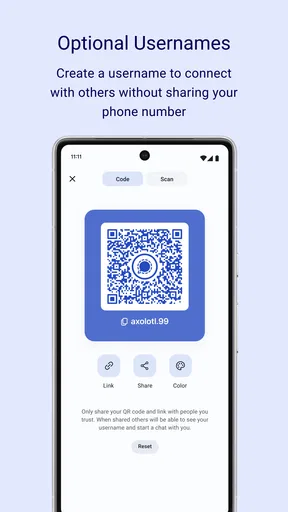
- Requires phone number to register.
- Fewer integrations than other apps.
- No multi-device support yet available.
- Limited group chat management features.
FAQs for Signal Private Messenger
What is Signal Private Messenger and how does it work?
Signal Private Messenger is a secure messaging app designed to provide end-to-end encryption for text messages, voice calls, and video calls. It ensures that all communications are private and can only be read by the intended recipient. With a simple interface and strong security features, it’s a popular choice for privacy-conscious users.
Is Signal Private Messenger really secure and private?
Yes, Signal is renowned for its strong security measures. It uses end-to-end encryption, ensuring that only the sender and recipient can read the messages. Signal does not store any user data or messages on its servers, and it also offers features like disappearing messages and screen security for added privacy.
Can I use Signal Private Messenger on multiple devices?
Signal can be used on multiple devices, such as your phone and desktop. However, it primarily functions through a single phone number. You can link your Signal account to a desktop app, which allows you to send and receive messages from your computer while syncing with your phone.
Are there any costs involved in using Signal Private Messenger?
Signal Private Messenger is completely free to download and use. There are no hidden costs or subscription fees. The app is supported by donations and grants, ensuring that it remains accessible to all users without any financial burden.
How does Signal compare to other messaging apps like WhatsApp or Telegram?
Signal is often compared to WhatsApp and Telegram due to its strong focus on privacy. Unlike WhatsApp, Signal is open-source and not owned by a major corporation, which many users find reassuring. Unlike Telegram, Signal uses end-to-end encryption by default for all conversations, making it a favorite among privacy advocates.


